SCREENSHOT: MAIN SCREEN16 / 9 · PNG
Sample screen — feature-specific screenshot pending
01 / 7
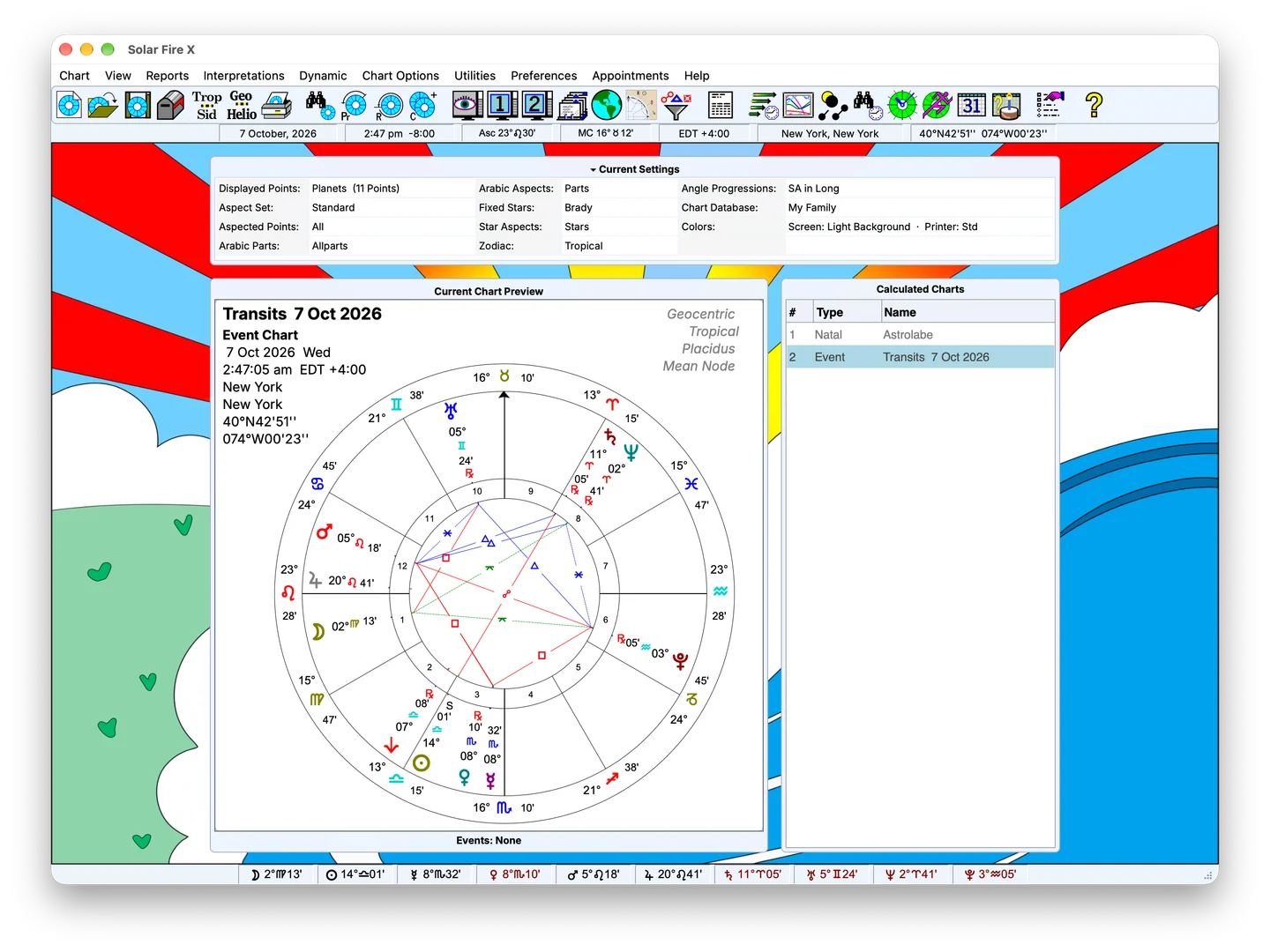
The main screen
Calculated charts, current settings and the planet bar — the desk everything starts from.
Related capability →Features
From chart calculation and forecasting to astrocartography, midpoint analysis and reports, Solar Fire X brings a broad range of astrological tools into one workspace. Explore the feature lists to see the calculations, views and editors available for your work.
Capability index
01 · Calculation · Wheels · Design
Calculate natal, event, progressed, return, harmonic and related charts. Compare them in multiwheels and synastry grids, then customise their presentation with the Wheel Designer and Page Designer.
Explore Charting →Sample screen — feature-specific screenshot pending
02 · Astro-locality · Relocation · Local space
Map angular lines, parans and local-space directions. Explore places, relocate charts and review geographic relationships in the integrated Solar Maps workspace.
Explore Maps →Sample screen — feature-specific screenshot pending
03 · Midpoints · Dials · Speculum
Work with dials, midpoint contacts, planetary pictures and coordinate views. Solar Fire X adds a dedicated Symmetry workspace alongside its chart and report tools.
Explore Symmetry →Sample screen — feature-specific screenshot pending
04 · Interpretation · Tabulation · Print
Turn calculated positions into chart analysis, aspect lists, midpoint tables and specialist reports. Arrange material in page layouts and use the output path suited to each view.
Explore Reports →Sample screen — feature-specific screenshot pending
05 · Interpretation · Text · Editing
Read chart-linked descriptions, browse interpretation topics and prepare full reports. Select the text files for your chart type and edit the wording for your own work.
Explore Interpretations →Sample screen — feature-specific screenshot pending
06 · Transits · Directions · Time Maps
Explore timing with transits, progressions, directions and returns. Use dynamic reports, Time Maps, the Graphic Ephemeris, calendars and animated charts to compare events over time.
Explore Forecasting →Sample screen — feature-specific screenshot pending
07 · Search · Elections · Data
Find charts that meet your criteria, or search a time interval for an election. Combine conditions for signs, houses, aspects, dignity, shapes, coordinates and midpoints.
Explore Research →Sample screen — feature-specific screenshot pending
By practice
If you are evaluating a particular practice, start with its workflow page. Electional astrology focuses on searching a practical interval; Traditional astrology on specified rules and calculations; Astrocartography on mapped lines and relocation.
See it work
Follow the main screen, chart view, forecasting, maps and output. Sample images and reserved media remain labelled until the relevant genuine captures are approved.
Sample screen — feature-specific screenshot pending
01 / 7
Calculated charts, current settings and the planet bar — the desk everything starts from.
Related capability →Sample screen — feature-specific screenshot pending
02 / 7
Aspectarian in the wheel, extra rings on, aspect highlighting doing its quiet work.
Related capability →03 / 7
The real-time clock and chart animation — watch transits arrive, then export the motion.
Related capability →Sample screen — feature-specific screenshot pending
04 / 7
The Time Map lays every dynamic event of a report along one ruler of time.
Related capability →05 / 7
An interactive astro-locality map — pan, zoom and read the angular lines — will live here.
Related capability →06 / 7
A short narrated walk through the 90° dial, pointer stepping and the speculum.
Related capability →07 / 7
From raw calculation to a designed client page in the Page Designer.
Related capability →Next step
Choose Solar Fire X and confirm current pricing and availability with Astrolabe.
Ordering opens Astrolabe’s external site, alabe.com — external site, alabe.com